
Figma virtual assistant services help you streamline your design workflow by offloading revisions, wireframes, and prototypes to skilled remote professionals. Stealth Agents connects you with expert Figma VAs so you can focus on creativity while they handle the details, saving you time and accelerating project delivery.
Hiring a Figma virtual assistant can significantly enhance your design workflow. The average hourly rate for Figma designers ranges from $25 to $50, depending on experience and complexity of tasks. By outsourcing design tasks such as wireframing, prototyping, and UI/UX adjustments, businesses can save time and reduce overhead costs compared to hiring full-time in-house designers. Stealth Agents offers skilled Figma virtual assistants who can handle your design needs efficiently, allowing your team to focus on strategic initiatives and creative development.
Hiring a Figma virtual assistant can help you effortlessly achieve perfect designs, allowing your creative team to focus on high-level strategy and innovation.
Figma is a powerful design tool that enables real-time collaboration and seamless UI/UX design workflows.
However, managing design iterations, organizing files, and ensuring design consistency can become time-consuming.
A Figma virtual assistant that specializes in design project management, file organization, prototyping, and design handoff, ensuring your creative process is streamlined and efficient.
Businesses outsourcing UX/UI design for Figma tasks save time, reduce workload, and improve design consistency and collaboration.
Stealth Agents connects you with skilled Figma virtual assistants who can handle design revisions, feedback management, and asset organization to ensure your projects meet deadlines without compromising quality.
Book a free consultation today to explore virtual assistant pricing and discover how a Figma expert can simplify your design process and boost productivity.
What is Figma?
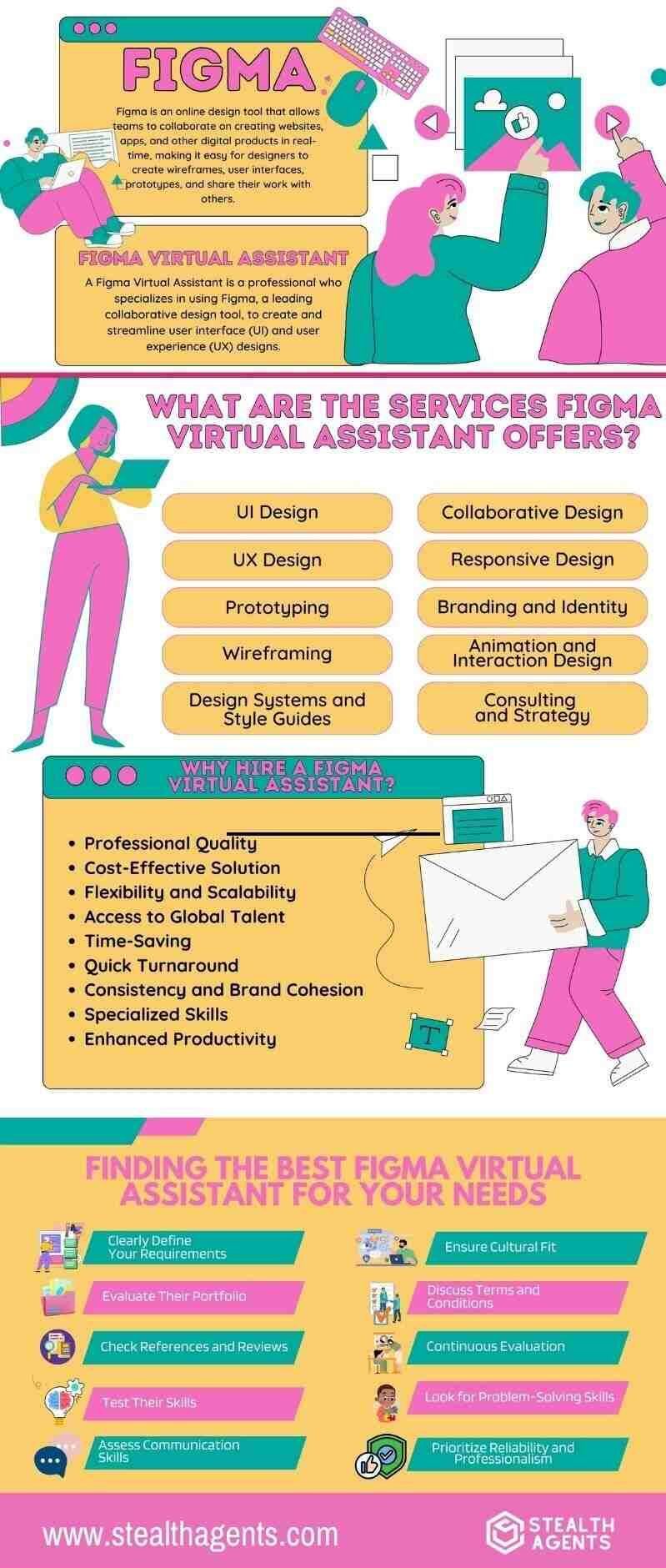
Figma is a powerful design tool for creating websites, apps, and other digital products. It works online, so you don’t have to download anything to your computer.
This makes it easy for teams to work together, as everyone can see changes in real time.
A Figma UI designer can create wireframes, user interfaces, and even prototypes in Figma.
Figma has a friendly interface that makes both beginners and experts feel comfortable. It allows you to share your designs, create feedback, and collaborate.
With its many features, it helps teams save time and create better designs recommended by the Figma community.
What is a Figma Virtual Assistant?
A Figma virtual assistant, another word for virtual assistant, is a professional who specializes in using Figma, a leading collaborative design tool, to create and streamline user interface (UI) and user experience (UX) designs.
These assistants remotely provide various Figma design assistant services, ensuring your digital products are visually appealing, intuitive, and user-friendly.
A UI design VA can also help collaborate with your team by sharing design drafts and gathering real-time feedback.
They excel at turning ideas into interactive prototypes, enabling you to visualize and test user journeys effectively.
Additionally, they stay updated on the latest Figma features and design trends, ensuring your projects are both modern and innovative.
By outsourcing these tasks to a skilled assistant, you can save time, focus on your core business responsibilities, and maintain high-quality design outcomes.
What are the Services the Figma Virtual Assistant Offers?
1. UI Design
- Website Design: Crafting visually appealing and intuitive website interfaces.
- App Design: Designing user-friendly interfaces for mobile and web applications.
- Dashboard Design: Creating clean and functional dashboards for data visualization and management.
2. UX Design
- User Research: To understand user needs, preferences, and pain points.
- User Flow Diagrams: Mapping out user journeys to ensure seamless navigation within the application or website.
- Usability Testing: Performing tests to identify and resolve usability issues, ensuring an optimal user experience.
3. Prototyping
- Interactive Prototypes: Develop interactive prototypes that simulate the final product, allowing for user testing and feedback before development.
- Clickable Mockups: Create clickable mockups to demonstrate the flow and functionality of your design.
4. Wireframing
- Low-Fidelity Wireframes: Produce basic wireframes to outline the structure and layout of your project.
- High-Fidelity Wireframes: Creating detailed wireframes with more refined design elements and interactions.
5. Design Systems and Style Guides
- Design Systems: Establishing and maintaining a cohesive design system to ensure consistency across all digital touchpoints.
- Style Guides: Develop comprehensive style guides that outline typography, color schemes, and other design elements.
6. Collaborative Design
- Real-Time Collaboration: Utilize Figma’s collaboration feature with team members, stakeholders, and clients.
- Feedback Integration: Incorporating feedback from various collaborators to refine and improve designs.
7. Responsive Design
- Mobile Optimization: Ensuring designs are optimized for mobile devices, providing a seamless platform experience.
- Responsive Layouts: Designing layouts that adapt to different screen sizes and orientations.
8. Branding and Identity
- Logo Design: Designing unique and memorable logos that reflect your brand identity.
- Brand Assets: Creating brand assets such as icons, buttons, and other UI elements that align with your brand guidelines.
9. Animation and Interaction Design
- Micro-Interactions: Designing subtle animations and interactions to enhance user engagement.
- Animated Prototypes: Develop animated prototypes to showcase how different elements interact within the design.
10. Consulting and Strategy
- Design Audit: Evaluating existing designs to identify areas for improvement and alignment with best practices.
- Strategy Development: Collaborating on design strategies that align with your business goals and user needs.
Why Hire a Figma Virtual Assistant?
1. Professional Quality
A Figma Virtual Assistant specializes in creating high-quality UI/UX designs using Figma, a leading collaborative design tool, often working alongside a design virtual assistant for brand consistency and creative support.
Their attention to detail ensures that every element aligns with your brand, and a remote Figma expert allows you to collaborate from anywhere without sacrificing quality.
When you hire a Figma VA, they can also demonstrate the potential of your product through dynamic and engaging prototypes.
These virtual assistants for Figma make sure your digital products look great and function seamlessly, meeting industry best practices.
2. Cost-Effective Solution
Outsourcing design work to a Figma freelancer VA can be more economical than hiring a full-time employee.
By working with a UX virtual assistant, you can access user experience expertise that enhances usability and engagement, without incurring costs like office space or equipment.
A design system assistant ensures consistency across your brand’s digital assets by maintaining cohesive components and layouts.
This cost-effective strategy allows you to allocate saved resources to other business areas. At the same time, a virtual assistant for creatives or a Figma prototyping VA delivers premium-quality, interactive designs tailored to your product goals.
3. Flexibility and Scalability
Virtual assistants offer the flexibility to scale services up or down based on project needs.
Whether you have a one-time project or ongoing design requirements, hiring a professional can adapt seamlessly.
For instance, when you hire user flow designers, their tailored approach ensures every stage of your project matches its specific demands.
This adaptability makes them an ideal solution for businesses of any scale.
4. Access to Global Talent
Hiring a virtual assistant means you are not limited by geographic location.
This global reach allows businesses to work with top-tier professionals without relocation barriers.
If you hire wireframing experts, you gain access to individuals skilled at creating clear and efficient layouts, offering unique insights and creative solutions.
This diverse perspective can elevate your projects significantly.
5. Time Savings
Delegating design tasks to a Figma virtual assistant frees up valuable time, enabling you to focus on core business activities such as strategy, marketing, and customer relations.
For example, when you hire a prototyping expert, they can refine and present designs quickly to keep your projects moving at a swift pace.
This ensures efficient project management while upholding high-quality design standards.
6. Quick Turnaround
Figma virtual assistants often work flexible hours and can meet tight deadlines.
Their dedication to delivering quality ensures that your business operations run smoothly.
If you need ID iterations, consider professionals who are well-versed in fast project delivery.
When you hire prototyping experts, their expertise ensures polished designs are completed promptly without compromising standards.
7. Consistency and Brand Cohesion
A dedicated virtual assistant can maintain consistency across all your design projects, ensuring they adhere to your brand guidelines.
This cohesion builds brand recognition and trust with your audience, fostering long-term success.
If you hire an interactive prototyping expert, they’ll assign every component with your core branding elements, providing a seamless experience for your users.
8. Innovative and Creative Solutions
An external perspective can bring fresh ideas and innovative solutions to your design projects.
Virtual assistants are trained to think creatively and provide unique insights.
When you hire user flow designers, their expertise can reimagine how users interact with your products, offering groundbreaking solutions that set you apart from competitors.
9. Specialized Skills
Figma virtual assistants possess specialized knowledge and experience in UI/UX design.
A UI/UX web design specialist proficient with Figma ensures your projects are handled precisely.
By hiring remote Figma developers, you ensure your projects are handled competently, producing professional results that meet both business objectives and user expectations.
10. Enhanced Productivity
By delegating design tasks to an expert, your in-house team can concentrate on their strengths and priorities, boosting overall productivity and efficiency within your organization.
For example, when you hire wireframing experts, they can streamline the initial steps of your processes.
This fosters a more focused and collaborative in-house environment, allowing you to achieve impressive results collectively.
Finding the Best Figma Virtual Assistant for Your Needs
1. Clearly Define Your Requirements
- Scope of Work: Specify the tasks you need assistance with, such as UI/UX design, prototyping, wireframing, or creating design systems.
- Skill Level: Determine the level of expertise required. Do you need basic design support or an expert in advanced Figma features?
2. Evaluate Their Portfolio
- Quality of Work: Review the candidate’s projects. Look for consistency and attention to detail.
- Relevant Experience: Ensure they have experience with projects similar to yours, indicating their capability to meet your specific needs.
3. Check References and Reviews
- Client Feedback: Review previous clients ‘ testimony, reliability, and communication skills.
- References: If possible, speak directly with past clients to get a first-hand account of their experience working with the virtual assistant.
4. Test Their Skills
- Sample Project: Assign a small, paid test project to evaluate their technical proficiency and understanding of your requirements.
- Technical Proficiency: Test their knowledge of Figma, including shortcuts, plugins, and any specific features you frequently use.
5. Assess Communication Skills
- Responsiveness: Ensure that the virtual assistant is responsive and communicates clearly. Effective communication is vital for remote work to avoid misunderstandings.
- Language Proficiency: Confirm they are proficient in your preferred language for seamless communication.
6. Ensure Cultural Fit
- Work Style: Assess whether their work style aligns with your company’s culture.
- Time Zone Compatibility: Consider time zone differences and ensure they can work within your preferred hours or accommodate overlapping working hours for effective collaboration.
7. Discuss Terms and Conditions
- Contracts: Define the terms of engagement, including payment structure, project timelines, and confidentiality agreements.
- Rates: Discuss the virtual assistant contract and their rates and ensure they fit within your budget while reflecting the quality and expertise they bring.
8. Continuous Evaluation
- Ongoing Feedback: Provide regular feedback and conduct periodic evaluations to ensure that the virtual assistant continues to meet your expectations.
- Adaptability: Ensure they are open to learning and adapting based on your feedback and evolving project needs.
9. Look for Problem-Solving Skills
- Creativity: An ideal virtual assistant should be able to think creatively and devise innovative solutions to enhance your design projects.
- Troubleshooting: They should possess strong problem-solving skills to address issues during the design process quickly.
10. Prioritize Reliability and Professionalism
- Dependability: Choose someone with a track record of meeting deadlines and maintaining high standards of professionalism.
- Commitment: Ensure they are committed to delivering quality work and are willing to go the extra mile to achieve the best results.

Why Choose Stealth Agents?
We understand unique businesses that succeed at Stealth. Businesses are committed to providing solutions that meet your needs.
Our team is dedicated to ensuring a seamless integration of virtual assistants into your operations. Whether you’re looking for Figma designers for hire, we’ve got you covered with tailored solutions.
We provide continuous support to address concerns and ensure smooth collaboration, just like a 24/7 virtual assistant. If you need a Figma designer for hire, we streamline the process to suit your business goals.
From onboarding to ongoing management, we are here to assist you every step of the way.
Our proactive approach ensures exceptional results for those who want to hire a virtual assistant or designer support.
Our commitment to proactive communication and problem-solving helps create a harmonious working relationship that maximizes the benefits of having a virtual assistant.

Design can take a lot of time. A Figma virtual assistant can help you with revisions and prototypes. Focus on your ideas while we handle the details. Get started today
Frequently Asked Questions
What is a Figma virtual assistant and how can they help with perfect designs?
A Figma virtual assistant is a remote design expert who uses Figma to create designs for websites, apps, and more. They help with tasks like making design changes, organizing files, managing feedback, and keeping designs consistent. This allows your team to focus on big-picture ideas while ensuring high-quality designs.
How much does it cost to hire a Figma virtual assistant for design work?
Figma virtual assistants usually charge between $25 and $50 per hour, depending on their experience and the work needed. This is more affordable than hiring full-time designers because you save on costs like office space, equipment, and benefits while still getting professional design help.
What specific design services do Figma virtual assistants provide?
They can create designs for websites and apps, make wireframes, build interactive prototypes, set up design systems, create responsive designs, design logos and branding, add animations, and review designs for quality. They handle everything from simple layouts to detailed, interactive designs.
Why should I hire a Figma virtual assistant instead of using in-house designers?
Hiring a Figma virtual assistant gives you access to skilled designers from anywhere in the world, saves money compared to full-time staff, and offers flexibility for your projects. They can work quickly and focus on specific tasks, letting your in-house team handle other important work.
How do Figma virtual assistants ensure perfect design quality and consistency?
They follow design best practices, stick to your brand guidelines, use design systems, and work with Figma’s tools for real-time collaboration. They also review designs regularly and stay updated on new design trends to make sure everything looks professional and consistent.
What qualifications should I look for when hiring a Figma virtual assistant?
Look for someone with a strong portfolio, experience using Figma’s advanced features, good communication skills, and a history of working on projects like yours. Check their references, test their skills with a small project, and make sure they can work during your preferred hours.
How quickly can a Figma virtual assistant deliver perfect designs for my project?
Figma virtual assistants are skilled and focused, so they can meet tight deadlines. The time it takes depends on how complex your project is, but their experience and ability to work efficiently mean they can deliver faster than training new team members or handling everything in-house.
What makes Figma virtual assistants better for design projects than other design tools?
Figma is a cloud-based tool that allows real-time collaboration, easy sharing, and quick feedback. Figma virtual assistants use these features to work faster, avoid file issues, and keep everyone on the same page. This makes the design process smoother and more efficient.
How do I find the best Figma virtual assistant for perfect design results?
Start by clearly explaining your project needs. Look at portfolios to check their work, read reviews from past clients, and test their skills with a small task. Make sure they communicate well, fit your budget, and have a track record of delivering great designs.
Can Figma virtual assistants work with my existing design team for perfect collaboration?
Yes, Figma virtual assistants are great at working with teams. They can share files instantly, take feedback from multiple people, keep designs consistent, and join design reviews. This teamwork helps your whole team stay productive while creating high-quality designs.